How far does your mouse go in a day?

Deskathon lives in your Mac’s menu bar and measures how far your pointer travels on every display, plus your clicks and scrolling. Every number gets a landmark, so you can picture it. Your statistics never leave your Mac.

Mac App Store, coming soon

Free, with an optional one-time Pro unlock.
macOS 14 or later.

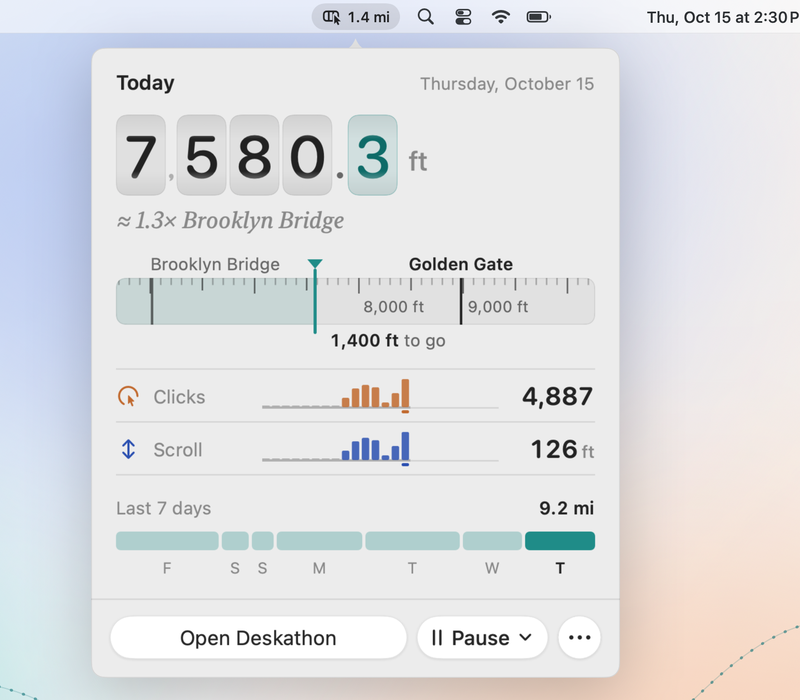
The Deskathon panel open under its menu bar item: today 7,580.3 feet on odometer drums, about 1.3 times Brooklyn Bridge, a measuring tape with 1,400 feet to go to Golden Gate, 4,887 clicks, 126 feet of scroll and the last 7 days.

Move your pointer. This page is counting.

The odometer here measures your pointer in this tab, the way Deskathon measures it on your Mac all day. When you pass a landmark, the next one comes up.

Your pointer on this page

0.00 meters. Not moved yet.

Not moved yet

Next: Olympic pool50.0 m to go

Measured in this tab at your browser’s 96 pixels per inch, and never saved. On your Mac, Deskathon uses each display’s real size.

Everything your pointer does, in numbers you can picture

Deskathon counts quietly from the moment you open it. Distance, clicks and scroll need no macOS permission. The pictures below are the app itself, with sample data.

Today

Distance on every display, with a landmark for every number

Deskathon measures how far your pointer travels, scaled by each screen’s real size, so a big external monitor and your laptop add up honestly. Today shows the total, how it splits across your displays, the next landmark and your busiest hours.

Clicks and scroll sit right below: left, right and other clicks by hour, and scrolling as real distance, in pages and sessions.

Metric or imperial. If macOS reports a screen’s size wrong, enter its diagonal in Settings › Displays.
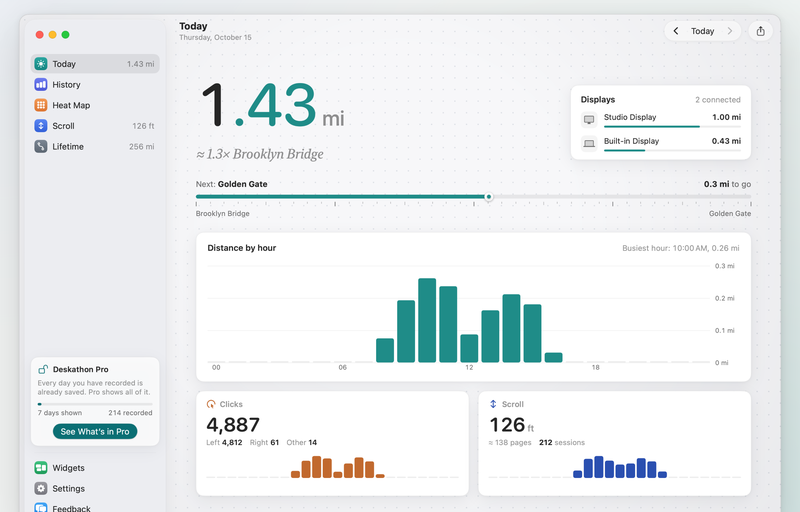
Deskathon’s window on Today: 1.43 miles, about 1.3 times Brooklyn Bridge, split between a Studio Display and the built-in display, with distance by hour, 4,887 clicks and 126 feet of scroll, beside the sidebar.

Heat maps

A heat map for each display

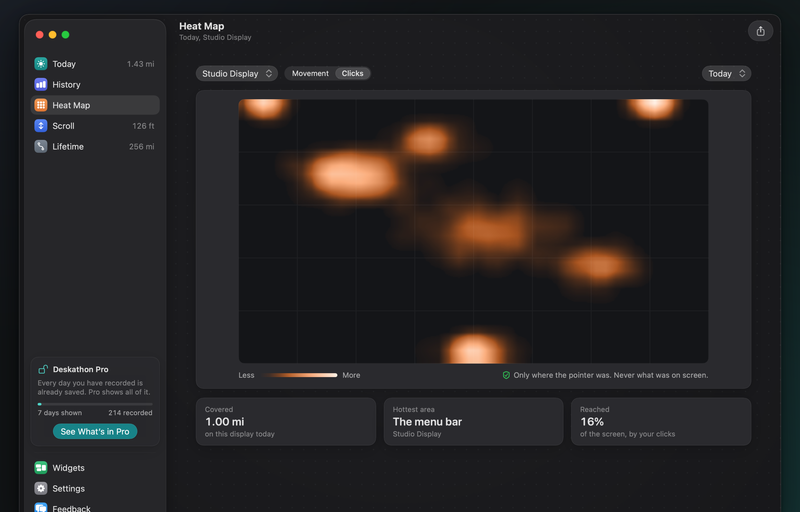
Switch between your displays, and between where your pointer moves and where you click. Deskathon draws the heat map on a plain outline of the screen and tells you where most clicks land.

It never captures what’s on your screen, so Deskathon needs no Screen Recording permission.

Today’s heat maps are free. Past days and the last 7 or 30 days come with Pro.

Deskathon’s Heat Map in dark appearance: click heat on an outline of the Studio Display, with 1.00 mile covered today, the menu bar as the hottest area and 16% of the screen reached by clicks.

History

Your best days, on record

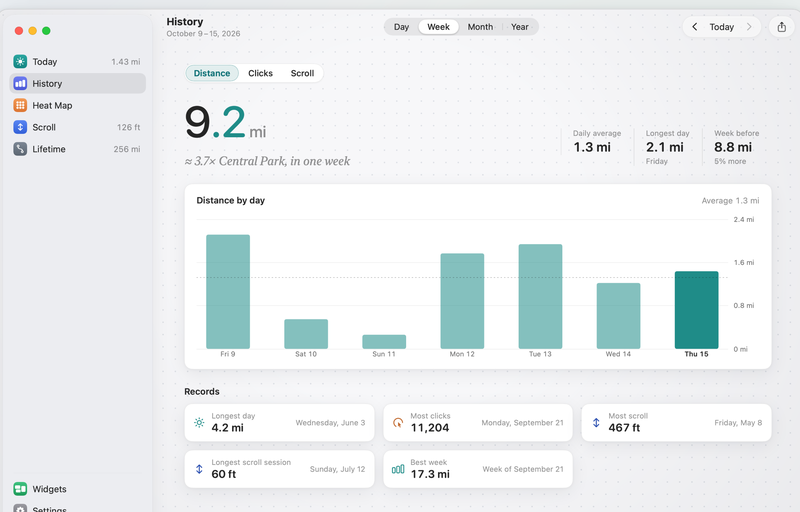
Look back by day, week, month or year, for distance, clicks or scroll. Records keep your longest day, most clicks, most scroll, longest scroll session and best week.

The last 7 days are free. Every earlier day, month and year, and Records, come with Pro. Everything is kept either way.

Deskathon’s History for the last 7 days: 9.2 miles with a daily average of 1.3 miles, a bar per day, and Records such as a longest day of 4.2 miles and 11,204 clicks in one day.

Lifetime

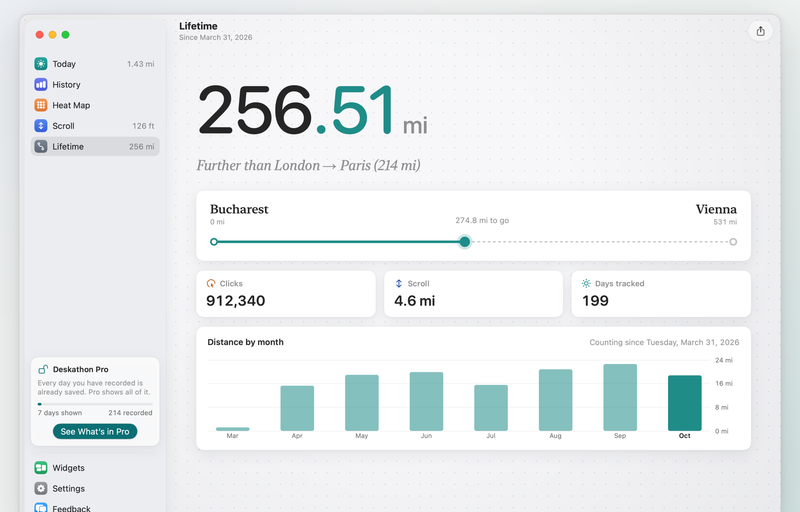
Your total since day one, as a trip

Lifetime adds up every display and every day. Your total becomes a trip between cities, “further than London → Paris”, with the next trip ahead of you. The last stop on the list is the Moon.

A chart below shows your distance for every month since you started.

Deskathon’s Lifetime: 256.51 miles, further than London to Paris, 274.8 miles to go on the trip from Bucharest to Vienna, 912,340 clicks, 199 days tracked and a bar for each month.

Widgets

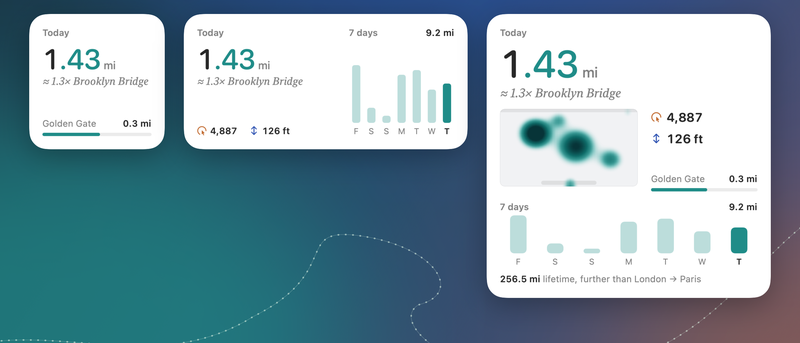
Today’s distance on your desktop

Put today’s distance and its landmark on your desktop or in Notification Center. Medium adds the last 7 days and today’s clicks; Large adds today’s heat map and your lifetime trip. Widgets refresh every few minutes and say when they were last updated.

Widgets has its own page in the app: it shows all three sizes with your own numbers, and how to add them to the desktop or Notification Center.

The Small widget is free. Medium and Large come with Pro.

Deskathon’s Small, Medium and Large widgets on a desktop: today 1.43 miles, about 1.3 times Brooklyn Bridge, 0.3 miles to Golden Gate, a 7-day chart, and a pointer heat map and lifetime trip in the Large widget.

Share cards

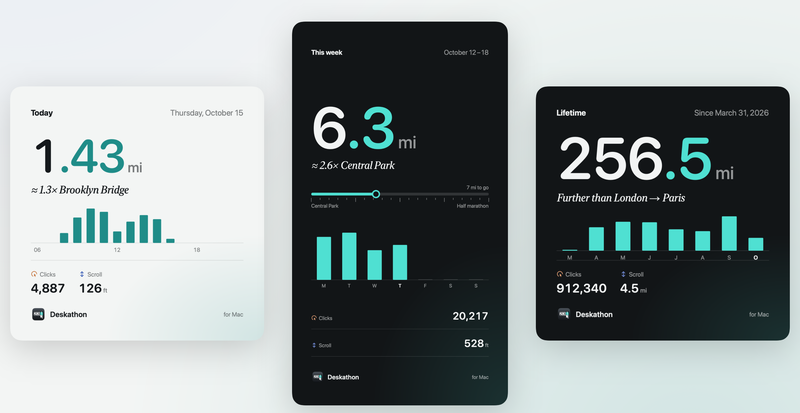
A card for your longest day

Turn today, this week or your lifetime into an image, square or story size, in light or dark. Cards show your numbers and a landmark, never your name, your displays or the time of day. They’re made on your Mac: save one, or send it with the share sheet.

Today, square, is free. Every other card and format comes with Pro.

Three Deskathon share cards: a light Today card with 1.43 miles, a dark story-size This week card with 6.3 miles, and a dark Lifetime card with 256.5 miles.

Optional

Key counts, only if you turn them on

Deskathon can also count how many keys you press each hour. It’s off until you choose it. Before macOS asks for Input Monitoring, Deskathon shows you exactly what’s counted. Say no, and everything else keeps working.

  • Counted: how many keys you press, per hour.
  • Never counted or stored: which keys, what you type, passwords, the order of keys, the apps you type in, or anything finer than an hour.
  • Your key counts never leave your Mac. Turn counting off, and delete the counts, any time in Settings › Keyboard.
  • A welcome that shows how it counts

    On first launch, a short welcome plays out distance, clicks and scroll, then lets you pick units and open at login. Skip it and every default stays as it is. Show it again from Settings › About.

  • In seven languages

    English, Romanian, German, French, Spanish, Italian and Japanese, with units and dates that follow your region. Deskathon follows your Mac’s language, or pick another in Settings › General.

  • Made like a Mac app

    One window with a sidebar that’s always there and Settings inside it, light and dark appearance, VoiceOver descriptions for every chart, keyboard shortcuts, and a menu bar item that stays out of the way.

Your statistics never leave your Mac.

The details are in the privacy policy.

App Store privacy label: Data Not Collected.

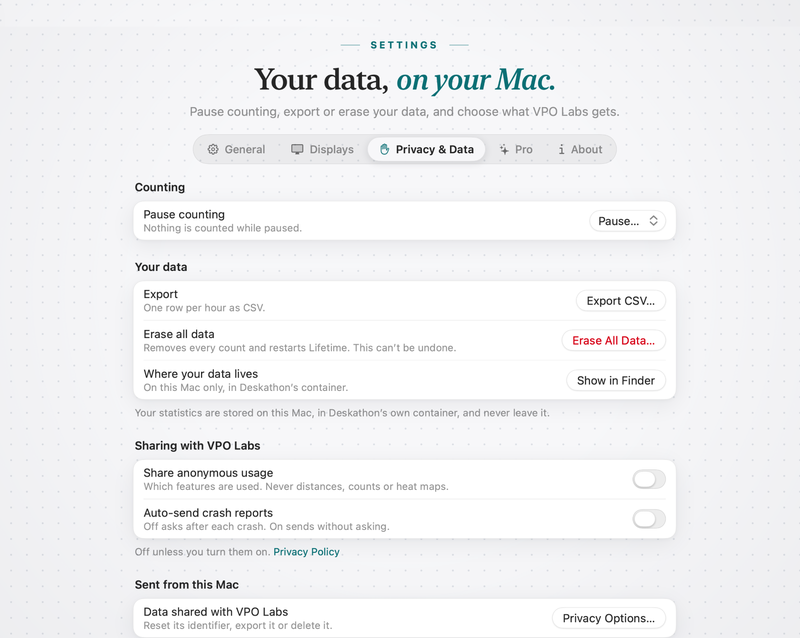
Deskathon’s Settings inside its window, on Privacy & Data: pause counting, Export CSV, Erase All Data and where your data lives, then under Sharing with VPO Labs two switches, share anonymous usage and auto-send crash reports, both off, and Privacy Options.
  • No account, no ads

    Nothing to sign up for. Your numbers live on your Mac.

  • No permission for your mouse

    Distance, clicks and scroll need no macOS permission. Heat maps use an outline of each display, never your screen.

  • Keys are opt-in, counts only

    Off by default. Turned on, Deskathon stores one number per hour and never which key.

  • Diagnostics only if you agree

    Crash reports, usage and errors stay off until you choose. Export or erase your data any time.

Free to use. Pro is a one-time unlock.

Same counting for everyone. Pro opens your full history, more widgets and cards.

What’s in Free and Pro
Feature FreeFree download ProOne-time in-app purchase
CountingDistance, clicks and scroll on every display, keys if you turn them on. All data kept.The same
Menu bar, Today and LifetimeEverything, with landmarks and tripsThe same
HistoryDay and week, last 7 daysEvery day, month and year, plus Records
Heat mapsToday, every displayAny past day, and the last 7 or 30 days
WidgetsSmallSmall, Medium and Large
Share cardsToday, squareToday, this week and lifetime, square and story
Privacy and controlPause, export CSV, erase all data, display calibrationThe same, never locked

One-time purchase, not a subscription. Family Sharing included.

Questions

More answers, and how to reach us, are on the support page.

Why would Deskathon ask for Input Monitoring?

Only if you turn on keyboard counting. macOS uses the same wording for every app with this permission; Deskathon only counts how many keys you press per hour. Say no, and everything else works.

Does Deskathon connect to the internet?

Not unless you turn on feedback or diagnostics. None of it carries your distances, counts or heat maps.

How accurate is the distance?

It uses the physical size each display reports to macOS. If a display reports the wrong size, enter its diagonal in Settings › Displays.
Does it work with more than one display?

Yes. Every display counts at its own scale and gets its own heat map.

Is Pro a subscription?

No, it’s a one-time purchase with Family Sharing. On a new Mac, use Restore Purchases in Settings › Pro.

What do I need?

macOS 14 Sonoma or later, Apple silicon or Intel, and any mouse or trackpad.