 Deskathon
Choose a period and a metric
Open History in the sidebar. Two controls set what you see: the period in the toolbar and the metric above the chart.
| Period | Shows |
|---|---|
| Day | One day, in 24 hourly bars. |
| Week | The 7 days ending today. Go back and you see the 7 days before. It isn’t a calendar week. This is the default. |
| Month | A calendar month. |
| Year | 12 monthly bars. |
The metric buttons are:
- Distance (the default)
- Clicks
- Scroll
- Keys
Press ← or → to move between them. The toolbar’s ‹, Today and › buttons step back and forward by one day, week, month or year, depending on the period.
Read the page
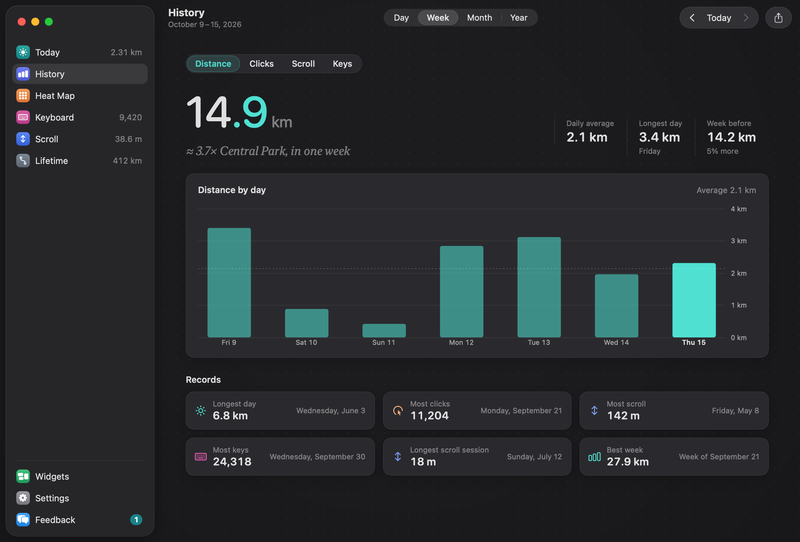
Total
The total for the period sits at the top. For distance and scroll it reads, for example, “in one week”, with a comparison to a landmark.
Stats strip
A row of three figures sits below the total.
| Figure | Shown for |
|---|---|
| Daily average | Week and Month. |
| Monthly average | Year, except for Keys. |
| Busiest hour | Day. |
| Longest day | Distance and Scroll. |
| Busiest day | Clicks and Keys. |
| Busiest month | Year. |
| Day before, Week before, Month before, Year before | The same figure for the period before. It reads less, more or About the same when the difference is under half a percent. |
Chart
The chart is titled by what it shows, for example Distance by day, Distance by hour or Distance by month. A dashed line marks the average.
While keyboard counting is off, a period with no key counts shows Keyboard counting is off and Turn it on to see key presses here.
Records
Below the chart, Records shows your best figures since Deskathon started counting. Records need Pro. Deskathon keeps them from day one, so they’re there when you unlock them.

- Longest day
- Most clicks
- Most scroll
- Most keys, which shows Off if keyboard counting was never on
- Longest scroll session
- Best week, the calendar week (starting on your Week starts on day) with the most distance, with the line Week of and the date it started. It isn’t the rolling 7 days of the Week period.
A card with nothing to show says No record yet.
What Free shows
Every day you record is saved, free or not. Without Pro you can see the last 7 days.
- Day and Week work for days inside the last 7 days. In a week that started earlier, the older days are locked.
- Month and Year carry a lock. Choosing one opens the Pro sheet and leaves the period as it was.
- Under the chart, the note Free shows the last 7 days. has a See Pro button.
- The Records cards are blurred with a lock and the note Your records are kept from day one. Pro shows them. Clicking a locked card opens the Pro sheet.
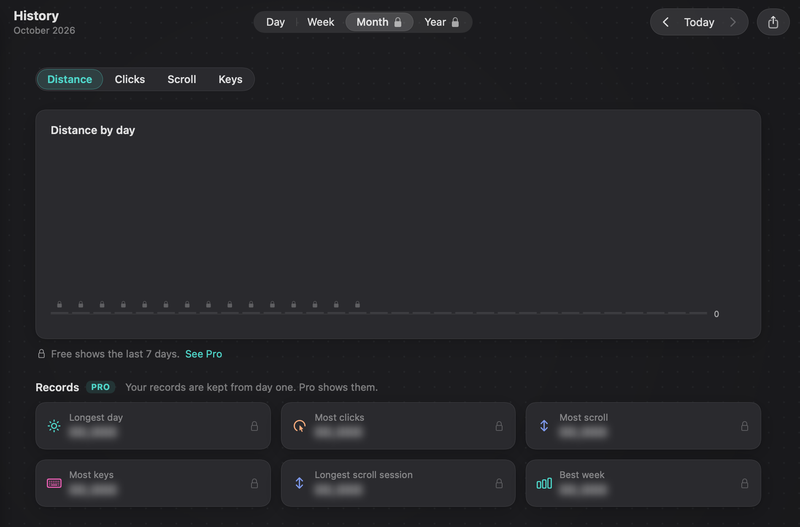
The Pro sheet only opens when you ask for something locked. Nothing is bought until you choose to buy. See Deskathon Pro.
Share a week
The Share button in the History toolbar opens the share sheet on the This Week card. Without Pro, the sheet opens on Today and shows This Week locked.