 Deskathon
The menu bar item

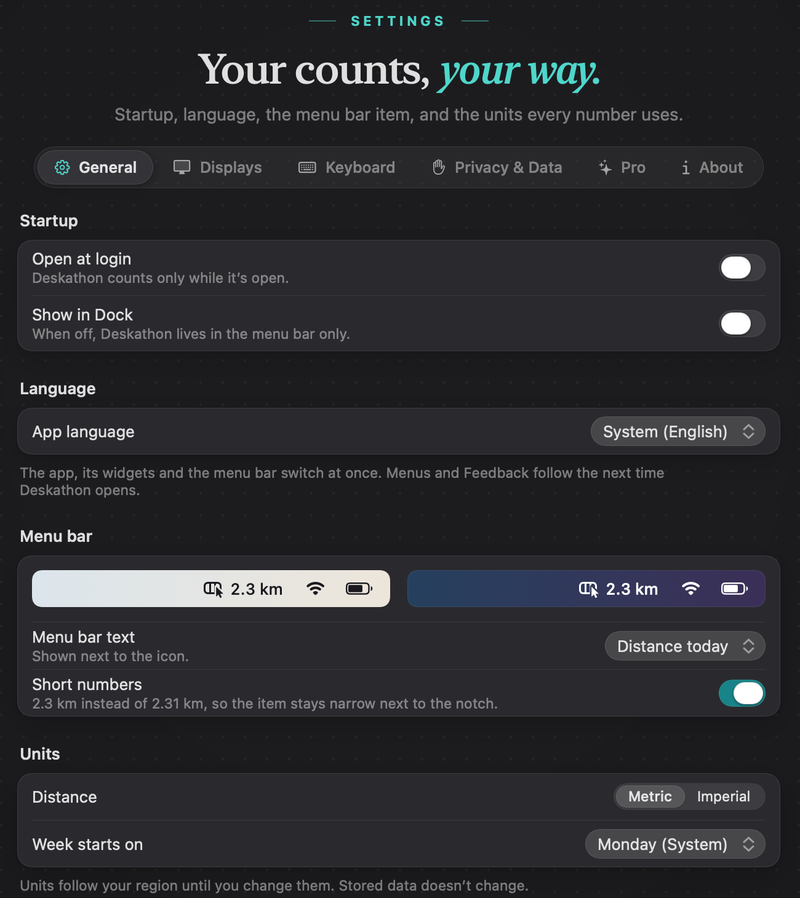
The item shows the Deskathon icon and one figure for today, such as 2.3 km. The figure updates at most once a second. You choose which figure it shows in the next section.
- Left-click opens or closes the panel.
- Right-click or Control-click opens a menu.
- While counting is paused, the item looks dimmed. The text doesn’t change.
- The item keeps its place in the menu bar between launches. Hold ⌘ and drag it to move it.
Hover over the item to see Deskathon as its tooltip. VoiceOver reads it as, for example, “Deskathon, 2.3 kilometers today”, and “Deskathon, paused” while counting is paused.
If the notch or other items hide it, see If you can’t see the icon.
The right-click menu
| Item | What it does |
|---|---|
| Open Deskathon | Opens the main window. |
| Resume | Appears only while paused. Starts counting again. |
| Pause | A submenu: Pause for 1 Hour, Pause Until Tomorrow and Pause Until I Resume. |
| Settings… | Opens Settings › General. Shortcut ⌘,. |
| Deskathon Help | In versions after 1.0, opens this guide in your browser. |
| Quit Deskathon | Quits Deskathon. Nothing is counted until you open it again. Shortcut ⌘Q. |
Choose what the item shows
- Choose Settings… from the right-click menu, or press ⌘, in the panel. Settings opens on General.
- In the Menu bar section, open Menu bar text and choose an option.
- Switch Short numbers on or off.
A preview in the same section shows the item on a light and a dark menu bar.
| Menu bar text | The item shows |
|---|---|
| Distance today | Today’s distance. This is the default. |
| Clicks today | Today’s clicks. |
| Scroll today | Today’s scroll distance. |
| Keys today | Today’s key presses. Offered only while keyboard counting is on. |
| None (icon only) | Just the icon. |
Short numbers is on by default. It keeps the item narrow next to the notch by dropping a decimal from the distance: 2.3 km instead of 2.31 km. Counts are always short, for example 12.4K. Either way, Deskathon cuts digits off rather than rounding them up, so the figure only ever counts forward.
The panel
Everything in the panel is free.
Header and hero
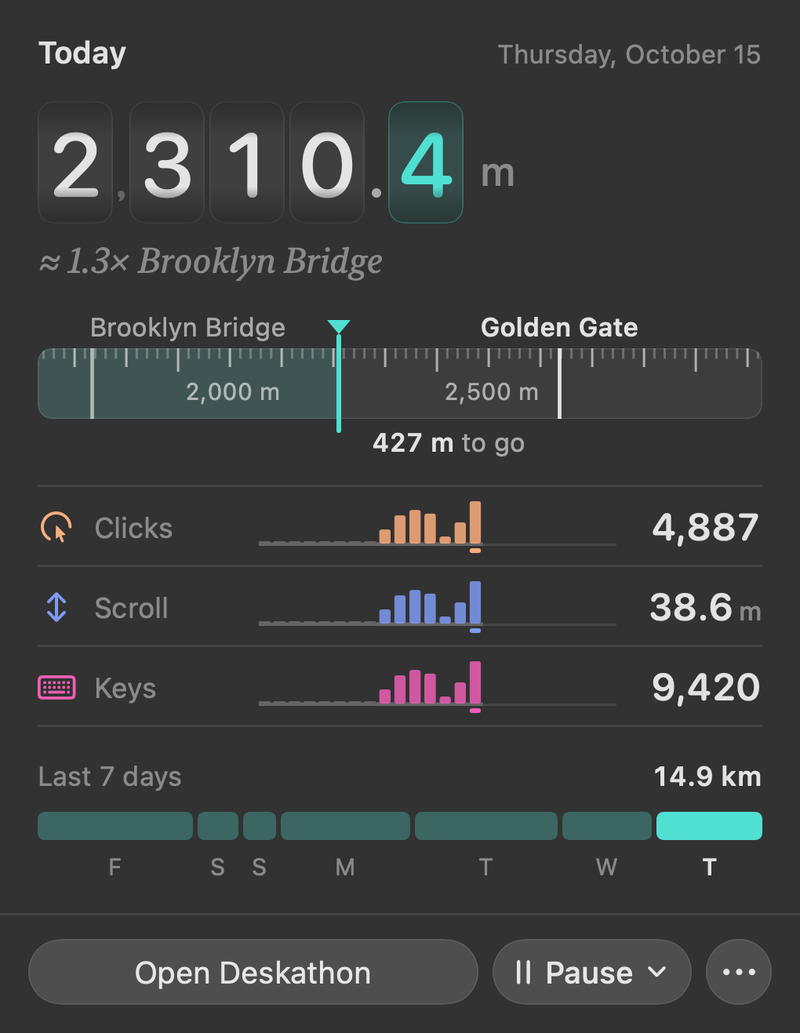
The header reads Today with the date. Below it, today’s distance rolls on odometer digits, with a comparison such as ≈ 1.5× Burj Khalifa. Below half a meter, it reads Not moved yet.
Landmark tape
A tape shows the landmark you have passed and the next one, with how far is left, for example 427 m to go. Lifetime, landmarks and trips lists them all.
Clicks, scroll and keys
Each row shows today’s total and a 24-hour chart.
- Clicks: left, right and other clicks added together.
- Scroll: how far you scrolled.
- Keys: key presses, if keyboard counting is on. When it’s off, the row says Off with an Open Settings link that opens Settings › Keyboard. See Keyboard counting.
Last 7 days
Last 7 days shows the total for the last seven days and a bar for each, with weekday letters. It’s a rolling window that ends today.
Buttons
- Open Deskathon opens the main window on Today. It’s the default button, so Return works too.
- Pause opens a menu with the three pause choices.
- ⋯ (More) opens a menu with Share…, Settings…, Deskathon Help (in versions after 1.0) and Quit Deskathon. Share… opens the share sheet on the Today card.
While the panel is in front, Return opens Deskathon, ⌘, opens Settings and ⌘Q quits.
Pause counting
You can pause from the panel, from the right-click menu, or in Settings › Privacy & Data. There are three choices.
| Choice | Counting resumes |
|---|---|
| Pause for 1 Hour | 1 hour from now. The panel shows the end time. |
| Pause Until Tomorrow | At the next midnight where you are. |
| Pause Until I Resume | When you choose Resume. |
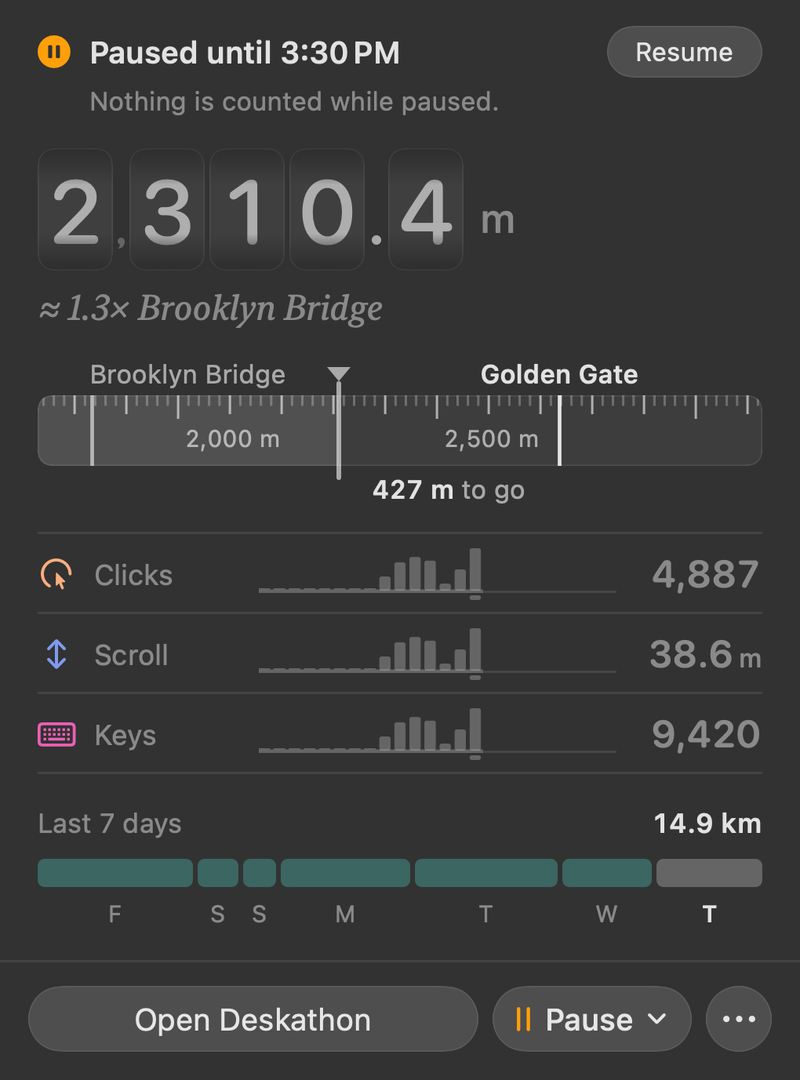
While paused, the panel header is replaced by a banner such as Paused until 3:30 PM, with a Resume button and the line Nothing is counted while paused. The menu bar item is dimmed and widgets show Paused. A pause survives quitting and reopening Deskathon.
Notices in the panel
Notices appear under the counters, only while they apply. Troubleshooting explains what to do about each.
| Notice | When you see it |
|---|---|
| Keyboard counting is paused: Input Monitoring is off | You turned off Input Monitoring for Deskathon after keyboard counting was on. |
| Secure Input is on, keys aren’t counted right now | Secure Input has been on for more than 10 seconds. |
| Counts can’t be saved right now. Deskathon keeps them in memory and keeps trying. | Saving has failed for 5 minutes. |
| Saved by a newer version. Read-only, nothing is counted. | Your data file was written by a newer version of Deskathon. |
| Your data can’t be saved. Counts are lost when you quit. | Deskathon couldn’t open or repair its data file. |
| Deskathon counts only while it’s open… | The login hint, shown once from your second launch on while Open at login is off. |