 Deskathon
Three sizes
Deskathon has one widget, called Today, in three sizes. Each shows today’s numbers on your desktop or in Notification Center.
| Size | What it shows | Needs |
|---|---|---|
| Small | Today’s distance, how it compares, and the next landmark. | Free |
| Medium | Adds the last 7 days, and clicks and scroll. With keyboard counting on, key presses take the place of scroll. | Pro |
| Large | Adds today’s heat map of your main display, and your lifetime trip. | Pro |
Deskathon Pro is a one-time in-app purchase. Read more about Pro.
Small
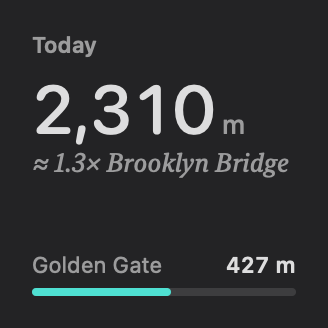
Medium
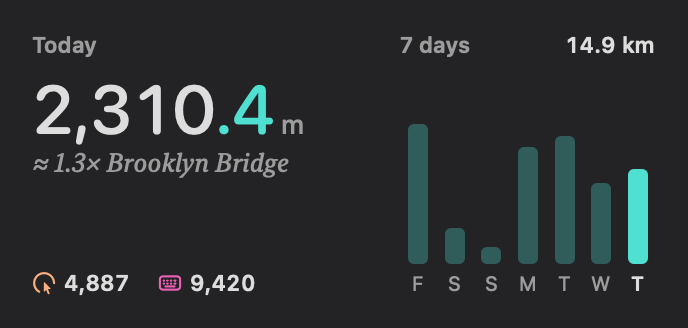
Large
The heat map on the Large widget is the Movement layer, as on the Heat Map tab.
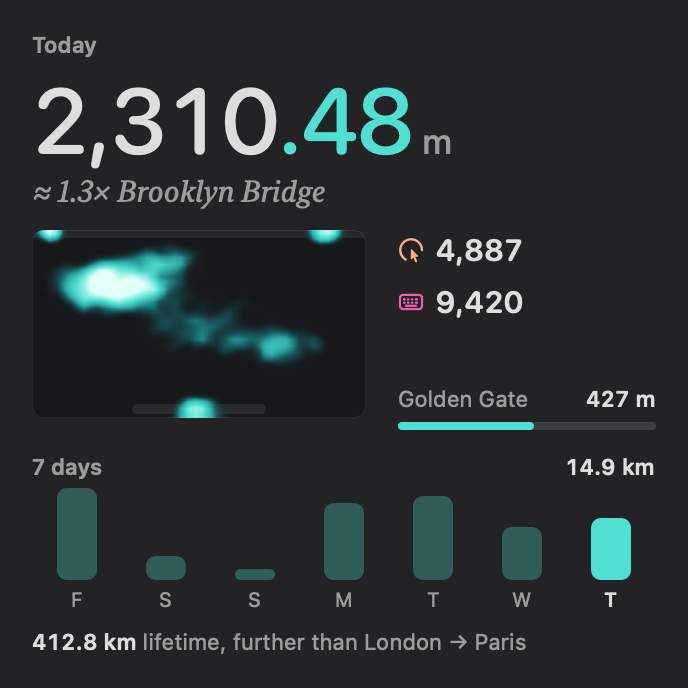
Add a widget
The Widgets row at the bottom of the sidebar shows live previews of each size and the steps below. You add widgets with macOS, not inside Deskathon.
On the desktop
- Control-click an empty part of the desktop and choose Edit Widgets.
- Type Deskathon in the search field.
- Click a size to add it, or drag it where you want it.
- Click Done.
In Notification Center
- Click the date and time in the menu bar.
- Scroll to the bottom and click Edit Widgets.
- Type Deskathon in the search field.
- Drag a size into the column, then click Done.
Medium and Large without Pro
Without Pro you can still add Medium and Large. They show a gray layout marked Medium widget or Large widget with Unlock with Pro in Deskathon. Clicking one opens Deskathon with the Pro sheet.
On the Widgets page, the Pro tag next to a size is a button that opens Settings › Pro.
How widgets refresh
Widgets show the numbers Deskathon last saved. They refresh every few minutes, not continuously. Between refreshes, today’s distance may move ahead a little, based on your recent pace, so it can differ slightly from the panel until the next refresh.
- When a widget’s numbers are more than 15 minutes old, it says so: Updated 20 min ago. After an hour it counts in hours, such as Updated 1 hr ago.
- While counting is paused, the widget shows a Paused chip.
- If Deskathon hasn’t counted anything yet, the widget says Open Deskathon to start counting.
At midnight, widgets reload for the new day.
Click a widget to open Today. On the Large widget, the heat map opens the Heat Map tab. Widget colors and where widgets appear are set in System Settings › Desktop & Dock.