 Deskathon
Free and Pro
Deskathon counts everything for free. Pro is a one-time in-app purchase with no subscription. It shows more of the history Deskathon has already recorded.
| Feature | Free | With Pro |
|---|---|---|
| Counting | Every display, always | Same |
| Menu bar item and panel | Yes | Same |
| Today and Lifetime, landmarks and trips | Yes | Same |
| History | Day and Week, within the last 7 days | Month and Year, every past date, and Records |
| Heat Map | Today, every display, both layers | Any past day, Last 7 Days and Last 30 Days |
| Scroll history in History | Last 7 days | Every day you’ve recorded |
| Keys history in History | Last 7 days | Every day you’ve recorded |
| Widgets | Small | Small, Medium and Large |
| Share cards | Today, Square | Today, This Week and Lifetime, Square and Story |
| Pause, Export CSV, Erase All Data, display sizes, units, Open at login | Yes | Same |
Counting, export and privacy controls are free for everyone. Every day you record is saved whether or not you have Pro.
What Pro adds
The Pro sheet lists these features:
- Full History and Records: month and year views, every past date, your best days.
- Heat maps over time: any past day, and the last 7 or 30 days on each display.
- Every share card: this week and Lifetime, square and story.
- Medium and Large widgets: the week, clicks and today’s heat map on your desktop.
- Longer Scroll history: scroll distance for every day you’ve recorded, not only the last 7.
- Longer Keyboard history: key counts for every day you’ve recorded, not only the last 7.
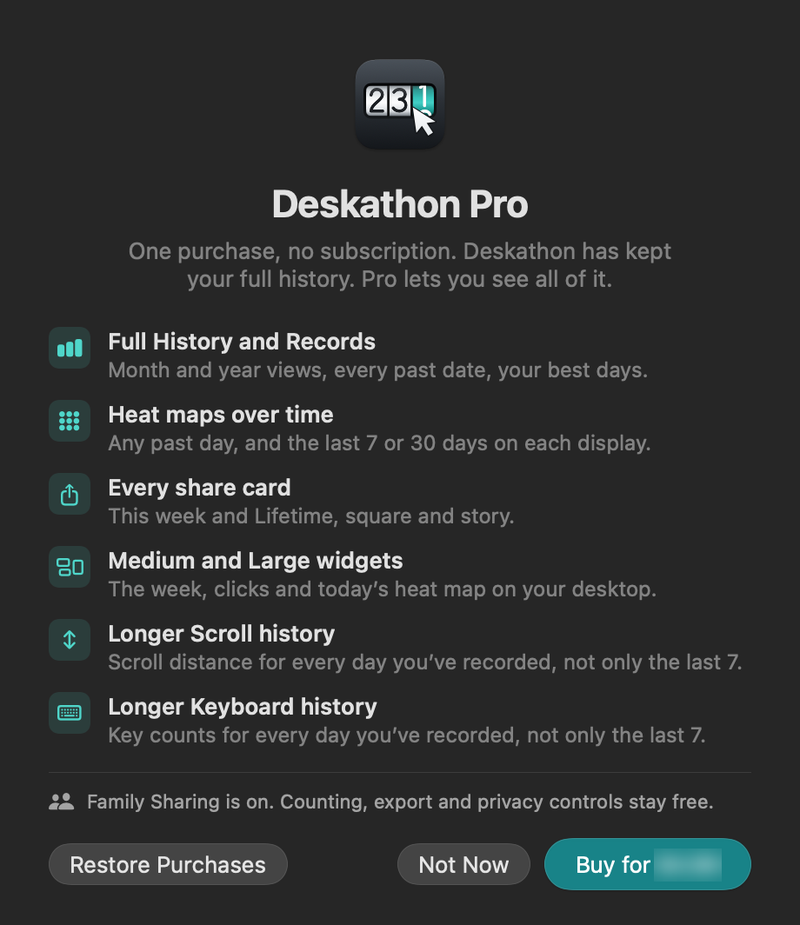
Buy Pro
Deskathon never shows the Pro sheet on its own. It opens only when you choose something that needs Pro, or when you ask for it.
- Open the sheet in one of these ways: click a locked item (a locked period in History, a locked card in the share sheet, a locked widget), or choose Settings › Pro and click Buy Pro for and the price, which opens the sheet.
- Read the list of what Pro adds. The price comes from the App Store for your country.
- On the sheet, click Buy for and the price, and confirm with the App Store as you would for any purchase.
- When it finishes, the sheet says Pro is unlocked on this Mac. Thank you. and the only button left is Done.
On the free version, the sidebar also shows a Deskathon Pro block. Its See What’s in Pro button takes you to Settings › Pro. It never buys anything.
Choose Not Now (or press Escape) to close the sheet. Until the App Store sends the price, the button reads Buy Pro and is dimmed, on the sheet and in Settings › Pro.
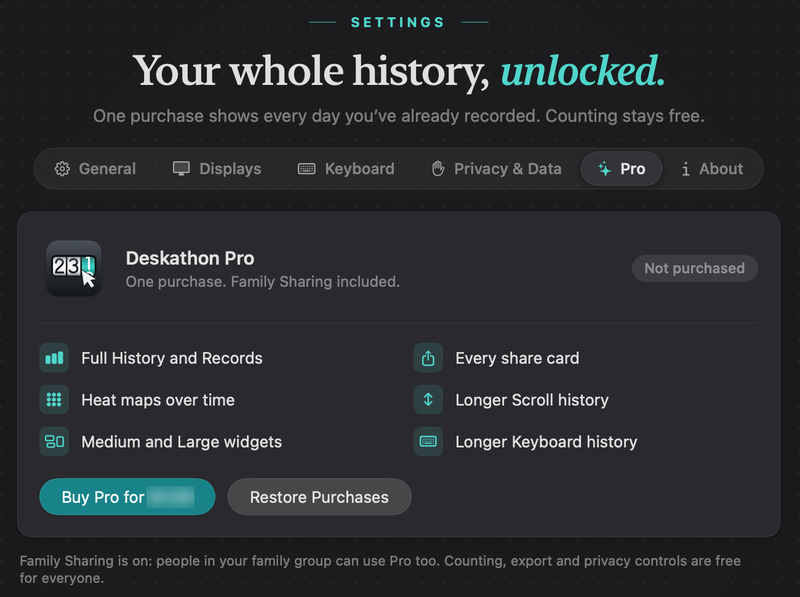
Restore Purchases
If you bought Pro on another Mac, or reinstalled Deskathon, use the same Apple Account to bring it back.
- Open the Pro sheet, or choose Settings › Pro.
- Click Restore Purchases.
The result appears on the sheet, just above the buttons, or under the buttons in Settings › Pro. See Messages you may see.
Family Sharing
Family Sharing is on for Pro. People in your family group can use it too. If someone in your family group bought Pro, open Deskathon on your Mac with your own Apple Account; if it doesn’t unlock on its own, click Restore Purchases. If your family organizer has to approve the purchase, you see Waiting for approval from your family organizer. Pro unlocks on this Mac as soon as it’s approved.
Messages you may see
These appear on the Pro sheet. Settings › Pro shows only the Restore Purchases results and the notice that Pro is no longer active.
| Message | What it means |
|---|---|
| Waiting for the App Store… | Deskathon is asking the App Store. Wait a moment. |
| The App Store can’t be reached, so the price isn’t available. Try again later. | You’re offline or the App Store is unavailable. Nothing was charged. |
| Pro restored. Thank you. | Restore Purchases found your purchase. |
| No purchase to restore. This Apple Account hasn’t bought Pro. | The Apple Account signed in on this Mac hasn’t bought Pro. Check which account is in use. |
| The purchase didn’t complete. You can try again, or choose Restore Purchases if you were already charged. | The purchase was interrupted. Try again, or restore. |
| The App Store couldn’t verify this purchase. Choose Restore Purchases to try again. | The App Store’s answer couldn’t be verified. Restore to check again. |
| Couldn’t restore purchases. Check your connection and try again. | The restore request failed, usually from a connection problem. |
| Pro is no longer active on this Mac. Your data is still here, and counting continues. | The purchase was refunded or revoked. Locked items return; nothing is deleted. |
Offline and refunds
Deskathon remembers that Pro is unlocked. If it can’t confirm your purchase with the App Store, for example because you are offline, it keeps Pro on for up to 7 days after the last time it was confirmed. After that it asks the App Store again.
Apple handles refunds. To request one, go to reportaproblem.apple.com. If a purchase is refunded, Pro turns off on the Mac and the message above appears. Your recorded data stays, and counting continues.