 Deskathon
What Deskathon counts
- Pointer distance, in real units, measured on each display.
- Clicks: left, right and other.
- Scroll: distance and sessions. A session ends after 2 seconds without scrolling.
- Keys, only if you turn it on: how many, never which.
Pointer distance, clicks and scroll need no permission. Deskathon counts only while it’s open. If you quit it, nothing is counted until you open it again, and it doesn’t fill in the gap.
How distance is measured
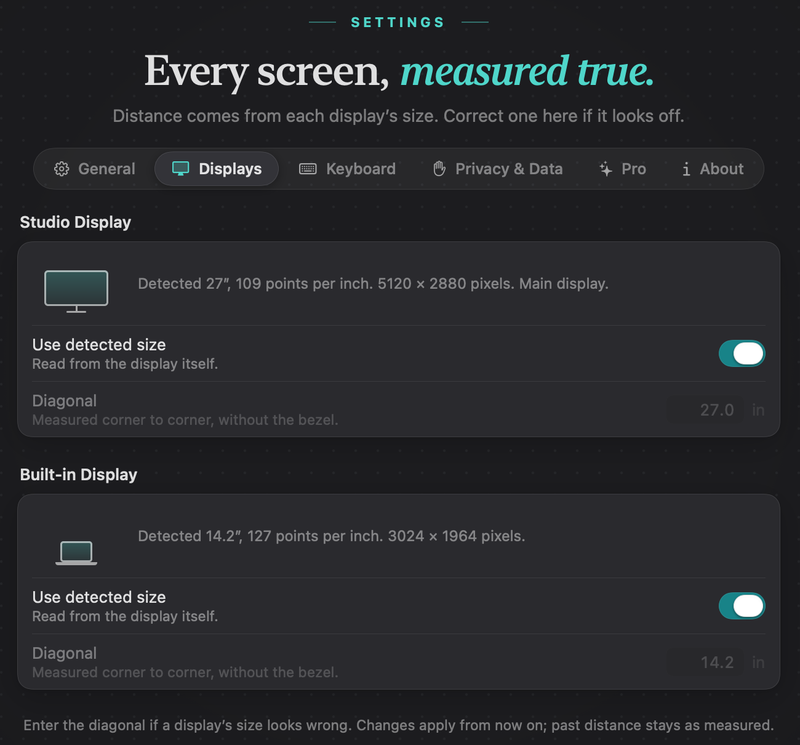
Deskathon follows the pointer on the screen and measures how far it travels. To turn that into meters or feet, it needs to know how big each display really is. It reads that from the display itself.
If macOS doesn’t report a usable size, which can happen with some TVs, AirPlay and virtual displays, Deskathon assumes 110 points per inch. For very large, low-density screens such as TVs, Deskathon uses the reported size but never assumes fewer than 20 points per inch.
If a display’s size looks wrong, enter the diagonal yourself in Settings › Displays. See Settings. Changes apply from now on. Past distance stays as measured.
Several displays
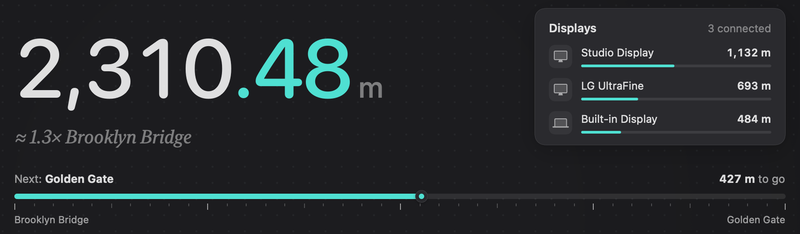
- Every display is counted, each by its own physical size. A path that crosses from one display to another is split, and each part is measured on its own display.
- Mirrored displays count once.
- A click that lands off every display is credited to the main display.
- The Today tab shows a Displays card when two or more displays counted distance on the day you’re looking at.
- Deskathon recognizes a display by its identity, so it keeps its numbers when you unplug and reconnect it. A display you removed stays in the Heat Map picker for 90 days after you last used it, labeled “not connected”.
Jumps are ignored
If the pointer teleports across the screen, for example when an app moves it or a remote session takes over, Deskathon doesn’t count the leap. A movement longer than a third of the larger display’s longest side is treated as a jump. The next movement counts from where the pointer landed.
Sleep, lock and other users
Nothing is counted while:
- the Mac or its displays are asleep,
- the screen is locked,
- another user’s session is in front, and
- you have paused counting (see Privacy and your data).
When the Mac wakes up, there is no jump, and clicks at the login window aren’t counted.
Days, time zones and clock changes
A new day starts at midnight on your Mac’s clock, within about a second. Today resets to zero, the bars on the week road shift by one, and widgets reload.
- Time zones. If you travel, the counts already stored keep the day they were recorded on.
- Daylight saving time. Those days have 23 or 25 hours, and the charts follow.
- Clock changes. Set forward, the skipped hours stay empty. Set back, later counts stay where they were and nothing is subtracted.
- Weeks. The first day of the week follows your region unless you pick one under Week starts on in General settings. Last 7 days is always the 7 days ending today.
Saving and running
Deskathon saves your counts when counting stops and about every 30 seconds while there is something new. If it can’t save, the panel tells you; see Troubleshooting.
Only one copy of Deskathon runs at a time. If you open it again, the running copy comes to the front and the second one quits without a message.