 Deskathon
Open the main window
The main window shows all your data. Open it in any of these ways:
- Click Open Deskathon in the panel.
- Choose Open Deskathon from the right-click menu on the menu bar item.
- Click the Dock icon, if you turned on Show in Dock.
- Click a Deskathon widget.
The sidebar
The sidebar is a fixed column. It lists the tabs of your data, then three pages at the bottom.
| Row | Shows |
|---|---|
| Today | Today’s distance. |
| History | Days, weeks, months and years. |
| Heat Map | Where the pointer went and where you clicked. |
| Keyboard | Today’s key presses, while counting. |
| Scroll | Today’s scroll distance. |
| Lifetime | Your total distance. |
| Widgets | Previews of the widgets and how to add them. |
| Settings | Every setting. |
| Feedback | Write to VPO Labs. A badge counts unread replies. |
Without Pro, a block at the bottom shows Deskathon Pro, the note Every day you have recorded is already saved. Pro shows all of it. and how many days are shown out of how many you have recorded. See What’s in Pro opens Settings › Pro. It never buys anything.
You can also switch tabs from the Go menu while the main window is in front. See Shortcuts and menus.
Move between days
On the Today and Scroll tabs, the toolbar shows the day you’re looking at, with three controls: ‹, Today and ›. The Keyboard tab has the same controls while its counts show.
- ‹ (Previous day) goes back one day. You can go back to the first day Deskathon tracked.
- › (Next day) goes forward one day.
- Today jumps back to today.
Next and Today are dimmed while you’re on today. While the main window is in front, ⌘[ and ⌘] do the same as ‹ and ›.
The Share button on the right of the toolbar opens the share sheet. On Today, it opens on the Today card. See Share cards.
What the Today tab shows
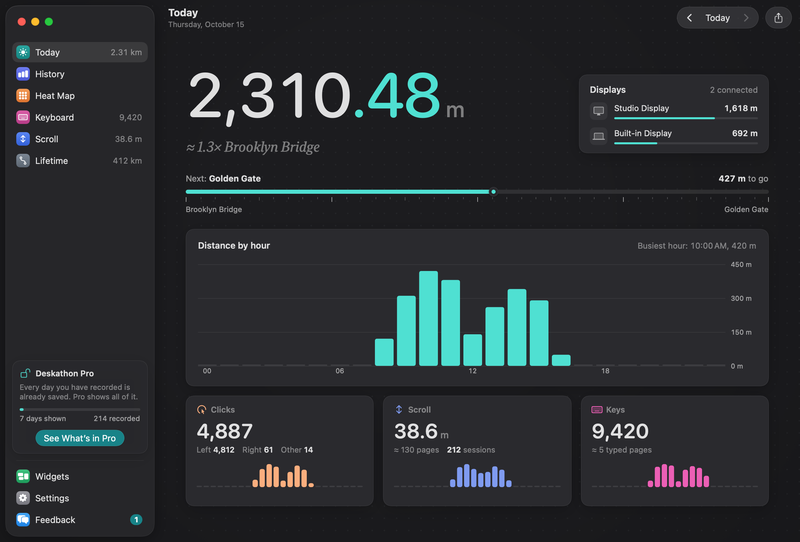
Distance
The big number is the distance your pointer has traveled on the day, on odometer digits. Below it, a comparison with a landmark, such as “about 1.3 times the Brooklyn Bridge”.
Displays
When two or more displays counted distance on the day you’re looking at (or, before anything is counted, were in use that day), a Displays card shows how many, for example 3 connected, with one row per display: its name, its distance and its share of the total. With one display, the card doesn’t appear.
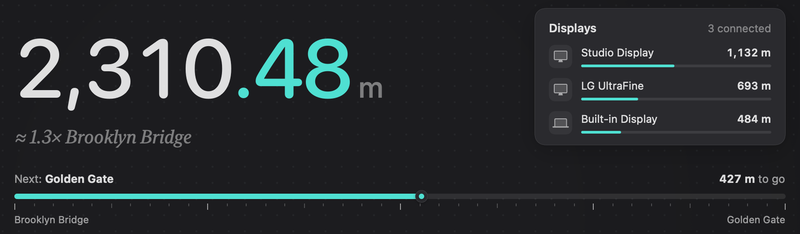
Landmark ruler
A ruler starts at Start and runs to the next landmark, with Next: and the distance to go. Landmarks are listed on Lifetime, landmarks and trips.
Distance by hour
A chart of the day, hour by hour. Early in a new day it reads Counting started. Each hour fills in as you go.
Clicks and scroll
- Clicks shows the total, split into left, right and other clicks.
- Scroll shows the distance you scrolled and how many sessions it took. See Scroll.
Keys
While keyboard counting is on, the Keys box shows the count and about how many typed pages that is. When it’s off, the box says Count how many keys you press per hour. Never which keys. with a Turn On… button that opens Settings › Keyboard. While Secure Input is on, or after macOS has taken the permission away, the box reads Paused with the reason under it. See Keyboard counting.