 Deskathon
What scroll counts
Deskathon turns scrolling into distance: how far content moved across your screen. A longer scroll adds more, and a faster flick that keeps gliding after you let go counts too.
The distance depends on the size of the display under the pointer, like pointer distance does. If the pointer isn’t on any display when you scroll, the scroll is credited to your main display. Scrolling needs no permission.
The Scroll tab is free.
Open the Scroll tab
- Click the Deskathon item in the menu bar, then click Open Deskathon.
- Choose Scroll in the sidebar. The sidebar row shows today’s scroll distance.
Read the tab
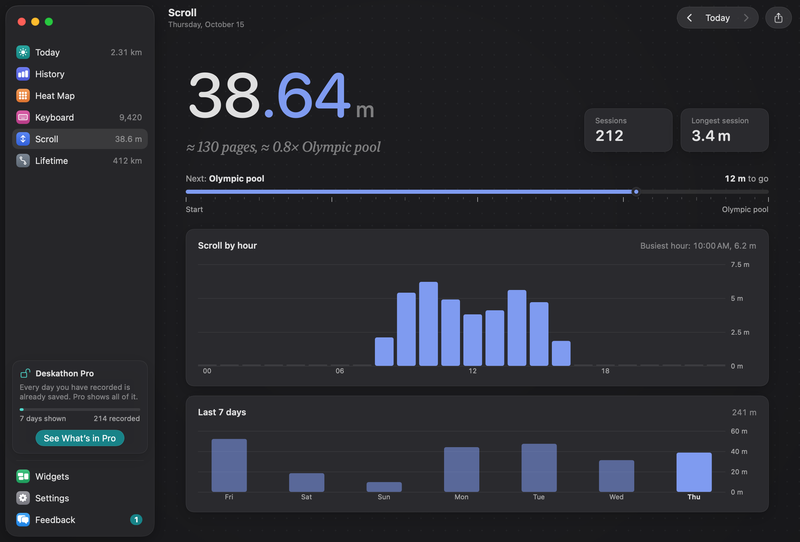
- The big number is the scroll distance for the day shown, on odometer-style digits. Under it you see an estimate in pages, such as “≈ 130 pages”, next to a landmark comparison. In metric, a page is an A4 sheet, 29.7 cm tall. In imperial, a page is a US Letter sheet, 11 in tall. Point at the estimate to see which. Change units in Settings › General.
- Sessions counts your bursts of scrolling. A session starts with your first scroll after at least 2 seconds of quiet, and ends after 2 seconds without scrolling. Bursts under 1 cm aren’t counted.
- Longest session is the distance of your longest single burst of the day.
- The landmark ruler shows the next landmark for your scroll distance, and how much is left to reach it.
- Scroll by hour is a bar chart of the day, one bar for each hour, with the busiest hour noted above it. Before you scroll, it reads “Counting started. Each hour fills in as you go.”
- Last 7 days has one bar for each of the last 7 days, with the week’s total above it.
Landmarks are real-world lengths that Deskathon compares your distance with. See the full list.
Look at an earlier day
The arrows at the top of the window, ‹ and ›, move to the previous and next day. Choose Today to come back. The next day and Today are dimmed while you are on today. You can go back to earlier days.
While the main window is in front, you can also press ⌘[ and ⌘] or use the Go menu. For longer periods, use the Scroll metric on the History tab.
Where scroll shows up
- The Scroll row in the panel, with a chart for the day.
- The Menu bar text setting, as Scroll today. See Settings.
- The Scroll tile on Today.
- The Scroll card on Lifetime.
- The Scroll checkbox on a share card.