 Deskathon
What Lifetime shows
Lifetime adds up everything Deskathon has counted since you first opened it. It is free, and it is the long view: total distance, how that compares with real trips, and your totals for clicks, scroll, keys and days.
- Click the Deskathon item in the menu bar, then click Open Deskathon.
- Choose Lifetime in the sidebar. The row shows your lifetime distance.
The line under the window title reads Since and the day counting began, or Since today on the first day.
Distance and your trip
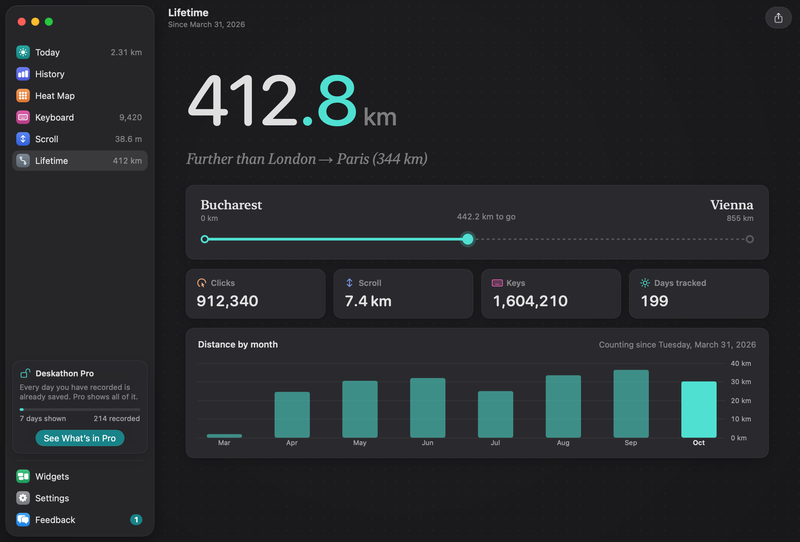
The big number is your lifetime pointer distance. Under it, a sentence tells you where that puts you among Deskathon’s trips, which are real routes between cities. It takes one of three forms:
- Next: London → Paris (344 km), when you haven’t yet reached 1% of the first trip.
- 12% of London → Paris (344 km), while you are on your way to the first trip.
- Further than London → Paris (344 km), once you have passed a trip. The sentence names the longest trip you have passed.
The trip card below it shows the trip you are heading for. The two cities sit at either end with their distances, a dashed route fills in up to your position, and the distance still to go sits in the middle. When you pass a trip, the card moves to the next one.
Trip lengths are in kilometers, or in miles if you choose Imperial in Settings › General.
Totals and months
A row of cards shows your totals:
- Clicks, all clicks added together.
- Scroll, total scroll distance.
- Keys, total key presses, or Off if keyboard counting was never on. The card counts only after you turn on keyboard counting.
- Days tracked, the number of days on which Deskathon recorded something.
Distance by month shows up to the last eight months, ending with the current one. Counting since and the date sit above it. The chart appears once there is a month to show.
Starting over
Erase All Data… in Settings › Privacy & Data restarts Lifetime from zero, and the first day becomes today. See Privacy and your data.
Landmarks
Landmarks are the yardsticks behind lines like “≈ 1.3× Brooklyn Bridge”. They are free for everyone. Deskathon compares your day’s distance with the longest landmark that fits in it, and shows how many times it fits. A shorter day shows a fraction of the Olympic pool, the smallest landmark. You see them in the panel, on Today, on the Scroll tab and in widgets. Under half a meter, it says Not moved yet.
The landmark ruler shows Next: with the next landmark and how far you have to go. After the Marathon, the next landmark is the Moon.
| Landmark | Length |
|---|---|
| Olympic pool | 50 m |
| Football field | 105 m |
| Eiffel Tower | 330 m |
| Burj Khalifa | 828 m |
| Brooklyn Bridge | 1,834 m |
| Golden Gate | 2,737 m |
| Central Park | 4,000 m |
| Half marathon | 21,097 m |
| Marathon | 42,195 m |
| The Moon | 384,400 km |
In English (UK), “Football field” reads “Football pitch”.
Trips
Trips measure your lifetime distance against journeys between places. They go from shortest to longest.
| Trip | Length |
|---|---|
| London → Paris | 344 km |
| Bucharest → Vienna | 855 km |
| New York → Chicago | 1,145 km |
| Madrid → Berlin | 1,870 km |
| New York → Los Angeles | 3,944 km |
| London → New York | 5,570 km |
| London → Tokyo | 9,560 km |
| Once around the Earth | 40,075 km |
| The Moon | 384,400 km |
The Large widget shows your lifetime trip as well. The Lifetime share card needs Pro.